


香橙派 OrangePi AI Pro 20T 接入 0.96寸 OLED 小屏幕
环境:OrangePi AI Pro 20T,Ubuntu 系统
屏幕:0.96寸 SSD1306 蓝黄双色 OLED,4针 IIC 接口
一、确认屏幕接口模式
本次使用的 OLED 模块支持 SPI 和 IIC 两种模式,4针版本默认已是 IIC 模式,引脚从左到右依次为:
GND VCC SCL SDA
如果你的模块是7针版本,需要通过板载电阻跳线切换到 IIC 模式(短接 R1、R4、R5、R6,去掉 R2、R3)。
二、接线说明
香橙派 AI Pro 的 40pin 扩展口提供了 I2C7 接口,对应引脚如下:
| OLED 引脚 | 功能 | 40pin 针脚编号 | 说明 |
|---|---|---|---|
| GND | 电源地 | 6号 | GND |
| VCC | 电源正 | 1号 | 3.3V |
| SCL | 时钟线 | 5号 | GPIO2_11 / SCL7 |
| SDA | 数据线 | 3号 | GPIO2_12 / SDA7 |
⚠️ VCC 请接 3.3V(1号脚),不建议接 5V,因为香橙派 GPIO 为 3.3V 逻辑电平。
40pin 排针位置示意(从左上角开始,奇数列在左,偶数列在右):
[1] 3.3V             [2] 5V
[3] SDA7  ← 接 SDA   [4] 5V
[5] SCL7  ← 接 SCL   [6] GND   ← 接 GND
...
三、检测 OLED 是否被识别
接好线后,用 i2cdetect 扫描 I2C 总线,注意必须加 -r 参数,否则某些设备不响应:
sudo i2cdetect -y -r 7
正常情况下会在 3c 位置看到设备地址:
     0  1  2  3  4  5  6  7  8  9  a  b  c  d  e  f
00:  ...
30: -- -- -- -- -- -- -- -- -- -- -- -- 3c -- -- --
如果全是 --,检查以下几点:
- 接线是否正确,SDA/SCL 有没有接反
- VCC 是否有电(接 1号脚 3.3V)
- 屏幕是否确实是 IIC 模式
四、安装依赖库
系统使用 Miniconda 环境,安装时需要用 Miniconda 的 pip,以 root 身份安装,这样 systemd 服务以 root 运行时也能找到这些包:
sudo /usr/local/miniconda3/bin/pip install luma.oled psutil
同时将当前用户加入 i2c 组,方便手动调试时不需要 sudo:
sudo usermod -aG i2c $USER
newgrp i2c   # 临时生效,或重新登录后永久生效
五、系统监控脚本
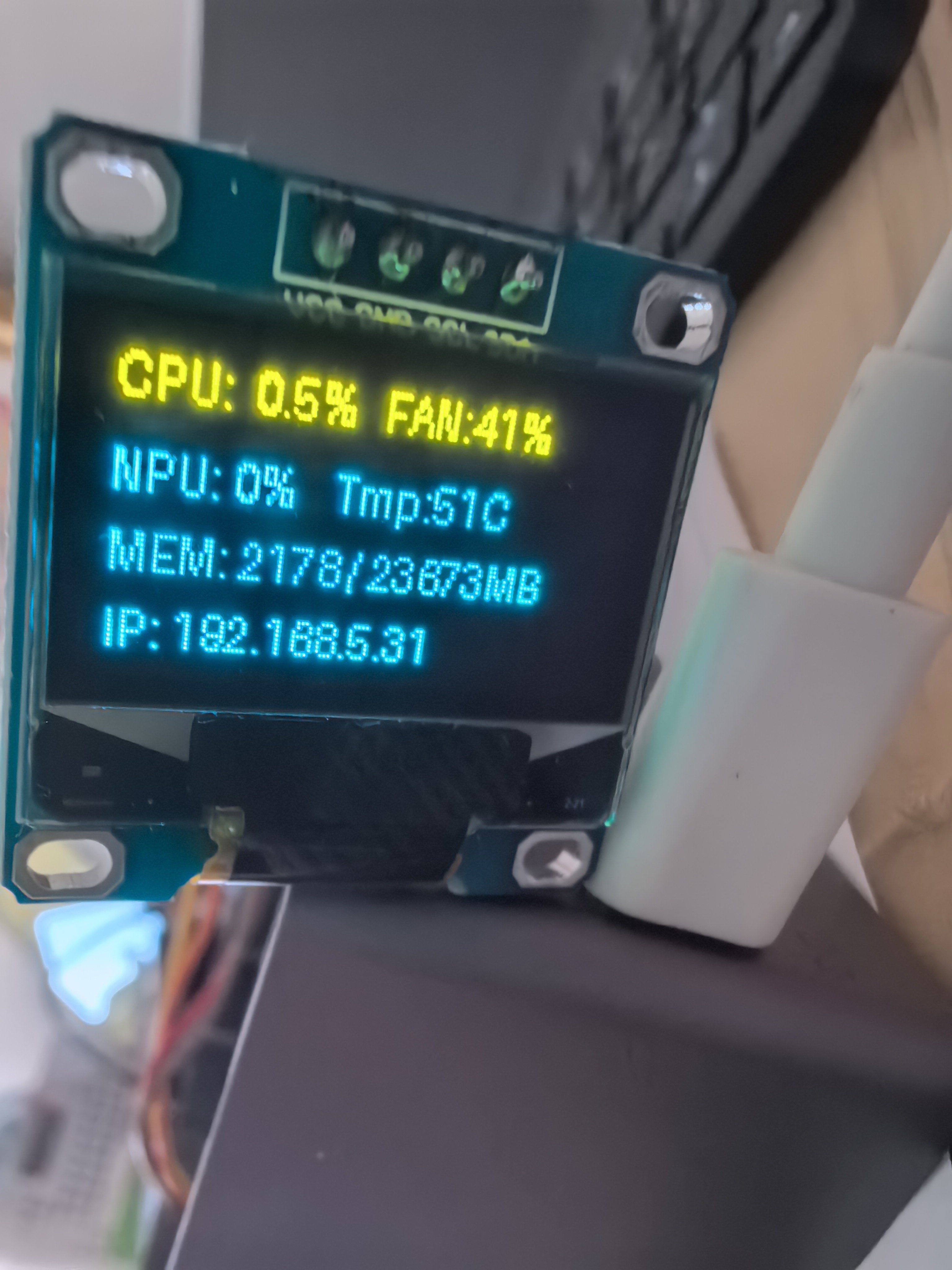
针对 AI Pro 这块板子的特点(跑 AI 推理任务为主),脚本显示以下4行信息:
- 第1行:CPU 使用率 + 风扇转速
- 第2行:NPU AICore 使用率 + NPU 温度
- 第3行:NPU 显存使用情况
- 第4行:本机 IP 地址
# system_monitor.py
from luma.core.interface.serial import i2c
from luma.oled.device import ssd1306
from luma.core.render import canvas
import time
import psutil
import socket
import subprocess
import os
import sys

def check_oled():
    """启动时等待 OLED 就绪,最多重试5次,每次间隔5秒"""
    for attempt in range(5):
        if not os.path.exists("/dev/i2c-7"):
            print(f"第{attempt+1}次检测:i2c-7 不存在,等待5秒...")
            time.sleep(5)
            continue
        try:
            result = subprocess.run(
                ['i2cdetect', '-y', '-r', '7'],
                capture_output=True, text=True, timeout=5
            )
            if '3c' in result.stdout.lower():
                print("OLED 检测成功!")
                return
        except Exception:
            pass
        print(f"第{attempt+1}次检测:未找到 0x3C,等待5秒...")
        time.sleep(5)
    print("多次检测均未找到 OLED,退出")
    sys.exit(0)

def get_npu_info():
    """从 npu-smi 解析 NPU 温度、AICore 使用率、显存占用"""
    try:
        result = subprocess.run(['npu-smi', 'info'],
                                capture_output=True, text=True, timeout=3)
        lines = result.stdout.strip().splitlines()
        temp = aicore = mem_used = mem_total = "N/A"
        for line in lines:
            if '310B1' in line:
                parts = line.split('|')
                vals = parts[3].split()
                temp = vals[1] + "C"
            if '| 0       0' in line:
                parts = line.split('|')
                vals = parts[3].split()
                aicore = vals[0] + "%"
                mem_used = vals[1]
                mem_total = vals[3]
        return temp, aicore, mem_used, mem_total
    except:
        return "N/A", "N/A", "N/A", "N/A"

def get_fan_speed():
    """获取风扇转速占比"""
    try:
        result = subprocess.run(
            ['npu-smi', 'info', '-t', 'pwm-duty-ratio'],
            capture_output=True, text=True, timeout=3
        )
        line = result.stdout.strip()
        fan = line.split(':')[-1].strip()
        return fan + "%"
    except:
        return "N/A"

def get_ip():
    """获取本机 IP 地址"""
    try:
        s = socket.socket(socket.AF_INET, socket.SOCK_DGRAM)
        s.connect(("8.8.8.8", 80))
        ip = s.getsockname()[0]
        s.close()
        return ip
    except:
        return "No Network"

# 启动时先检测设备
check_oled()

# 初始化 OLED
try:
    serial = i2c(port=7, address=0x3C)
    device = ssd1306(serial)
except Exception as e:
    print(f"OLED 初始化失败: {e}")
    sys.exit(0)

print("系统监控启动,Ctrl+C 退出")

try:
    while True:
        cpu_percent = psutil.cpu_percent(interval=1)
        npu_temp, aicore, mem_used, mem_total = get_npu_info()
        fan = get_fan_speed()
        ip = get_ip()

        with canvas(device) as draw:
            draw.text((0,  0), f"CPU: {cpu_percent:4.1f}%   FAN:{fan}", fill="white")
            draw.text((0, 16), f"NPU: {aicore}    Tmp:{npu_temp}", fill="white")
            draw.text((0, 32), f"MEM: {mem_used} / {mem_total} MB", fill="white")
            draw.text((0, 48), f"IP: {ip}", fill="white")

        time.sleep(3)

except KeyboardInterrupt:
    device.clear()
    print("已退出")
except Exception as e:
    print(f"运行异常: {e}")
    sys.exit(0)
将脚本保存到 /home/HwHiAiUser/system_monitor.py,手动测试运行:
python3 system_monitor.py
六、设置开机自启动
使用 systemd 管理服务,以 root 用户运行,确保 npu-smi 有足够权限。
1. 创建服务文件:
sudo nano /etc/systemd/system/oled-monitor.service
写入以下内容:
[Unit]
Description=OLED System Monitor
After=network.target

[Service]
Type=simple
User=root
ExecStartPre=/bin/sleep 10
ExecStart=/usr/local/miniconda3/bin/python3 /home/HwHiAiUser/system_monitor.py
Restart=always
RestartSec=15
StandardOutput=journal
StandardError=journal

[Install]
WantedBy=multi-user.target
说明:
User=root是因为npu-smi需要 root 权限才能读取 NPU 信息,服务本身只做系统信息展示,无安全风险。ExecStartPre=/bin/sleep 10是为了等待开机后 i2c 总线完全初始化。
2. 启用并启动服务:
sudo systemctl daemon-reload          # 重载配置
sudo systemctl enable oled-monitor    # 设置开机自启
sudo systemctl start oled-monitor     # 立即启动
sudo systemctl status oled-monitor    # 查看运行状态
3. 常用管理命令:
sudo journalctl -u oled-monitor -f    # 实时查看日志
sudo systemctl stop oled-monitor      # 手动停止
sudo systemctl disable oled-monitor   # 取消开机自启
sudo systemctl restart oled-monitor   # 重启服务
七、OLED 未插入时的处理逻辑
脚本启动时会先扫描 /dev/i2c-7 设备,检测不到 OLED 时最多重试5次(每次间隔5秒),全部失败后静默退出。systemd 设置为 Restart=always,会在15秒后再次尝试,直到插入 OLED 为止。
| 场景 | 行为 |
|---|---|
| 开机时未插 OLED | 每次重试5次后退出,15秒后再试,不影响系统 |
| 开机时已插 OLED | 检测成功后正常显示系统信息 |
| 运行中拔掉 OLED | 捕获异常退出,15秒后重启服务重新检测 |
八、效果说明
屏幕分辨率 128×64,默认字体行高 16px,正好显示4行内容:
CPU:12.3% FAN:35%
NPU:0%  Tmp:50C
MEM:1907/23673MB
IP: 192.168.1.100
数据来源说明:
- CPU 使用率:
psutil - 风扇转速:
npu-smi info -t pwm-duty-ratio(PWM 占空比,反映风扇转速) - NPU 温度 / AICore 使用率 / 显存:
npu-smi info,适用于板载 310B1 昇腾芯片 - IP 地址:通过 UDP socket 探测本机出口 IP
九、常见问题排查
扫描不到 OLED(i2cdetect 全是 --)
- 检查接线,特别是 SDA/SCL 是否接反
- 必须用
sudo i2cdetect -y -r 7,不加-r某些设备不响应
手动运行正常,systemd 服务启动失败
- 检查依赖库是否以 root 身份安装:
sudo /usr/local/miniconda3/bin/pip install luma.oled psutil - 用
sudo /usr/local/miniconda3/bin/python3 /home/HwHiAiUser/system_monitor.py手动以 root 跑,看具体报错
屏幕显示内容不刷新
- 确认服务状态是
active (running)而非inactive - 查看服务日志:
sudo journalctl -u oled-monitor -f
运行效果如图:
目前在 OrangePi AI Pro 20T + Ubuntu 系统上测试通过。